Blockly Dictionary
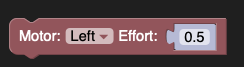
Set the motor effort from -1.0 to 1.0 and start the motor. Negative values turn in the opposite direction. Motor efforts are based on the applied voltage, but are not the same as rotation, since changes in web_log_data will change the rate of rotation.
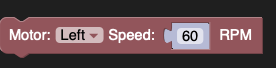
Set the motor rotational velocity expressed in RPMs (revolutions per minute). Setting speeds greater than the motor can spin will just run at maximum speed. Negative values spin the motor in the opposite direction. This uses a PID controller to try to constantly control the effort to keep the rate of rotation at the specified value.
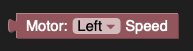
Get the motor speed in RPMs (revolutions per minute).
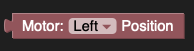
The position of the encoded motor, in encoder counts, relative to the last time reset was called.

Gets the position of the encoded motor, in encoder counts, relative to the last time reset was called.

Resets the encoder position to zero.
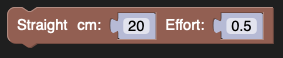
Go forward the specified distance in centimeters, and exit function when distance has been reached. Max_effort is bounded from -1 (reverse at full speed) to 1 (forward at full speed)
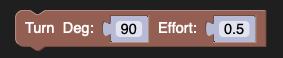
Turn the robot some relative heading given in degrees, and continue Until the robot has reached that heading. effort is bounded from -1 (turn counterclockwise the relative heading at full speed) to 1 (turn clockwise the relative heading at full speed) This block uses the IMU to determine the heading of the robot and P control for the motor controller.
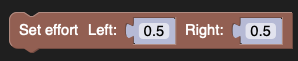
Set the effort of the left and right motors using the supplied values ranging from -1.0 to 1.0.

Varies the effort on each wheel motor to keep the robot driving at the requested speed. As the load changes, the effort will change by a value to keep the speed constant.

The robot will drive at the specified speed and at the same time, turn by an amount based on the second parameter ranging from -1.0 to 1.0. This is especially useful for steering the robot using proportional control where the 2nd parameter is the gain.

This block will stop both drivetrain motors. It does not effect the other motors that might be in use on the robot.

The left and right motor encoders are reset to 0.
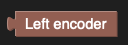
This block is the value of the left encoder.
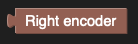
This block is the value of the right encoder.
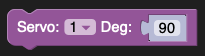
This block sets the servo angle between 0 and 200 degrees.

The sonar sensor measures the distance to objects in front of the rangefnder. It does this by using ultrasonic sound that is emitted from one of the transducers on the sensor and measuring how long it takes for the echo to return to the other transducer. Knowing the speed of sound, then sensor then calculates the distance to the object. The distances are returned in centimeters.
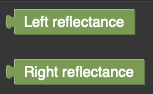
The reflectance sensor, actually left and right reflectance sensors, each with an LED and a photocell. The LED shines light onto the surface below the sensor and the photocell measures the intensity of reflected light. The range of values returned vary from 0.0 to 1.0 delending on the amount of reflected light.
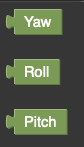
The gyro sensor measures the rate of rotation in the X, Y, and Z axis. The rates are integrated (summed over time) giving the rotation angle. For example, if the rate was 10 degrees per second and it is summed for 2 seconds, it would indicate 20 degrees of rotation.
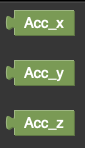
The accelerometer measures the acceration of the robot in the X, Y, and Z axis. One common use of is to measure the acceration due to gravity that the robot is always experiencing. If the robot is level on a surface, then the Z accelerations will be 1G but as the robot tilts, for example going up or down a slope, the force due to gravity is reduced in the Z axis based on the angle of tilt. This allows the robot to know if it is going up a ramp or other slope.

Turns the LED on the circuit board on.

Turns the LED on the circuit board off.

This block represents the state of the user button, 1 for pressed and 0 for released.

This block will wait until the user button is pressed. The is particularly useful to make sure that your program doesn’t start running until the robot is in position after turning it on.
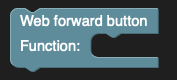
Assign a function to the forward button.
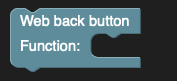
Assign a function to the backward button.
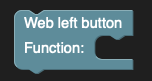
Assign a function to the left button.
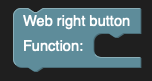
Assign a function to the right button.
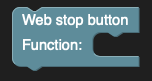
Assign a function to the stop button.
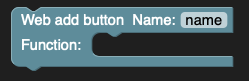
Registers a custom button to be displayed on the webserver.
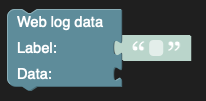
Display the specified value on the web server along with the label.

Begin the webserver in either access point or bridge mode. The IP is printed to the console.

Connect to a wifi network with the given ssid and password. If the connection fails, the board will disconnect from the network and return.
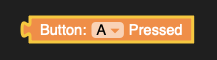
Return 1 if a button is being pressed or zero if not. The choices for the buttons are in the dropdown.
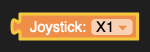
Get the value for a joystick. The values are from -1 to 1 for full forwards to full backwards. The particular joystick and axis is selected in the dropdown for the block.
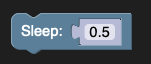
Pause the program for the specified number of seconds at this block. You may specify a fractional value for seconds to get smaller or more precise values.

This block will conditionally execute the blocks contained within the if-do block. If the specified logical expression (one which is either true or false) is true, the enclosed blocks are executed, otherwise they are skipped. Additionally, you can add alternate blocks if the expression is false by clicking on the gear icon and adding «else» blocks.

Relational operators express the relation between values as true or false. There are 6 choices of relational operators, equals, not equals, greater than, less than, greater than or equals and less than or equals.

Logical operators combined with relational operators let you create more complex boolean (true or false) expressions. The logical operators are OR (either of 2 operands are true) and AND (both operands are true). The result is true depending on the operands and the operator used.

the NOT operator returns true if the pararmeter is false and returns false if the” parameter is true. It literally returns the opposite value specified as the argument.

This block is a boolean (either true or false) value that can be used in conditional expressions or in other places where a boolean value is needed. For example, if the argument of a repeat-while loop is true, it will repeat indefinely making what is referred to as an infinite loop.

The null value represents a non-existant value that can be tested for in programs. For example, in functions that returns a value unless there is some special case, and then can return null. Null can be tested for by the calling function.
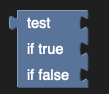
The test block returns one of two values depending on whether the argument is true or false.
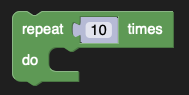
This block runs the code contained in the block body (do statements) the specified number of times. After it is finished, the block following the repeat is executed.
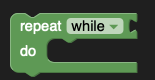
This block runs the code contained in the block body (do statements) repeatedly while the specified condition is true. The condition is tested before the code is executed the first time, so if the condition is false on executing this block, the block body code is not executed. Optionally the while condition can be changed to until by selecting until from the pull-down, and then the code will be executed repeatedly until the condition is true.
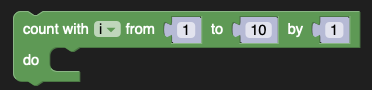
The count block advances a variable from the first value to the second by the increment amount and running the do block once for each value. The block will count up with a positive increment and can count down with a negative increment. Typically 1 is used for the increment, but it can be any value, such as 2 to count even or odd numbers.
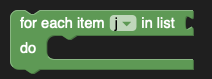
A for each block assigns the loop variable to each value in a list one at a time. With each assignment, the do statements are executed. When all the elements of the list have been assigned, the loop ends.
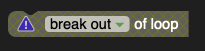
A break block exits from the loop it is contained in. This is typically used with a conditional to exit a loop early in an exception case or when the loop task is completed. You can Optionally change break to continue, in which case, the loop will continue on the next iteration or loop, skipping the rest of the blocks in do section.

A numeric constant block that makes it possible to introduce a numereic constant value into an expression. For example, to compare a distance with 10, a comparison block, such as greater than can be used with a sonar sensor value as one operand and a constant block with a 10 as the other.
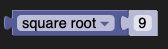
This block takes a value and applies a numeric fuction to it, producing a result. The types of numeric functions inclide square root, absolute value, negate, natural log (ln), log base 10, e raised to the power, and 10 raised to the power.
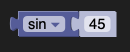
This block takes a value and peforms a trig funcgtion on it. The types of functions are sin, cos, tan, arcsin, arc cosine, and arc tangent.

This block provides a constant value for commonly used values. The types are pi, e, square root of 2, square root of 1/2, and infinity.
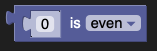
This block tests a value to determine if it is a particular type. The choices are even, odd, prime, whole, positive, negative, and divisible by a value.
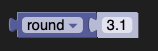
This block rounds its numeric parameter either up (to the next integer), down (to the lower integer), or rounds it to the nearest integer, either up or down.

This block is given a list of values as a parameter and can return a value based on the list values. It can find the sum, the minimum value, the maximum value, the average value, the median value, the modes, the standard deviation, or choose a random item from the list.

The remainder block computes the remainder (modulus) of the divison of the two numeric parameters.

The constrain block returns a value that is constrained by two values. In other words, if the parameter (1st number) is between the low and the high value, then the number is returned. If the value is less than low value, then the low value is returned. If it is higher than the high value, then the high value is returned. This is especially useful in robotic applications where you want to make sure that, for example, the effort values you are supplying for a motor are always within the allowable (-1 to 1) range.

The random integer block returns a pseudo-random integer value in the range of the two parameters.
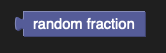
The random fraction returns a floating point (fractional) value between 0 up to (and not including) 1.

The comment block can be used to add information about your program to tell you or someone else what the program does. The blocks are ignored when the program is running, it is only for clarity of the program for a reader.

The parameter of the print block is displayed in the shell output windows in the XRPCode application.

The string constant block takes a string literal (any visible characters) and can use then in expressions requiring strings. For example, checking if a string variable is equal to the value «ON» can be done with a comparison block and a string constant.
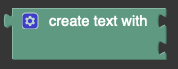
The create text block takes a number of text values and concatenates (merges) them together to form a larger string. if more than 2 input values are required, more inputs can be added by clicking on the gear icon and dragging more inputs to the block.

The append text block appends a string value to the end of the input string and returns the new string as the operators value.
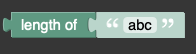
The string length block returns an integer number of characters in the string argument.

The is empty block returns true if the string parameter has no characters and false otherwise.

The find string checks to see if find string (2nd value) is contained within the first string. It returns either the character position of the search string or zero if it is not found. It can either search for the first occurance or the last occurance of the search string.

The get letter block is very flexible and returns particular characters from a text string. It can either return the first character, the last character, the character that is at a position relative to the start of the string, the character that is at a position relative to the end of the string, or a random letter from the string.

The find substring block returns a part of the parameter string. The returned value is the substring (or enclosed string) from the starting letter # to the ending letter #.

The change case block returns the parameter string with all the letters converted to the specified case. The choices are upper case (all capital letters), lower case, or title case where the first letter of each word is capatalized.

Trim removes spaces from an input string. The options are leading spaces (start of the input string), trailing spaces (end of the input string), or both sides of the input string.

The read text block reads input from the keyboard of the device running the Blockly program.

The empty list block creates a list with no elements. Input values can be added to the block by clicking on the gear icon, mnaking the functionality the same as the create list block. This and the next block create identical results if the number of input values are configure to be the same.
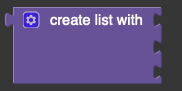
The create list block can create a list with an arbitrary number of elements in it. The number of elements can be customized by clicking on the gear icon and adding or removinig elements. This and the previous block create identical results if the number of input values are configure to be the same.

This list creates an arbitrary sized list filled with the specified value.

The get list element block can perform several functions. It can get the list element at a specified position in the list. It can also get the specified element and delete it from the list. And it can also just remove the item from the list. In the first 2 cases the block returns a value. When only removing an item, it does not return a value and can be inserted into a group of statements.

The list length block returns the number of elements in the list.

The is empty block returns true or false depending on whether the list supplied as a parameter has any elements.

Find the first or last occurance of an element in a list and returns the items position in the source list.

This edit list block is very flexible and can perform many function on lists. Depending on the setting of the set parameter, it will either set or insert a list element at the specified position. The position of the insert or replace operation can be at a particular index from the beginning or the end of the list, the first element of the list, the last element of the list, or a random element of the list.

The sublist block can return a portion of the list argument. The starting position of the sublist can either be an index from the start of the list, the end of the list, or the first element of the list. The ending position can either be an index from the beginning of the list, from the end of the list, or the last element of the list.

This make text to list block can take a string and make a list with one element per substring each delimiited with a specified string. For example, a phone number might have 3 sets of numbers each delimited by hyphens (-), and this block can create a list with 3 elements, each a string that was between the hyphens. The block will do the opposite, that is make a list into a text string by concatenating all the elements of the list with the delimeter inbetween each element.
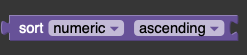
The sort block takes an input list and returns a list sorted in ascending or descending order using either numeric sorting, alphabetic sorting, or alphabetic sorting ignoring the case of letters.

The create variable button is not a block, but when pressed promts for the name of a variable to create. The variable gets added to the list of variables in this section and can then be used throughout the program.

The set variable block sets the specified variable to the given value. If instead of specifying a variable name, «rename variable» is selected, then this block will reanme the variable to the new name wherever it appears in the program. Similarly, if «Delete the variable» is selected, the block will delete all blocks that reference this variable wherever it appears in the program.

The change variable block can change the value of a variable by a specified amount, either positive or negative. It is shorthand for using a set block with an add or subtract block.
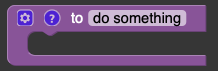
The to do something block will create a new block in the Functions section of the palette. The new block will execute all the blocks contained within this block whenever it is used. Optionally, the function block can add parameters to modify the behavior by clicking on the geear icon and adding parameters (inputs) to the input section of the block definition. Those parameters will be avaible as variables inside the function.
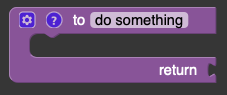
The function block with a return value is identical to the function block (previous block) except that it returns a value and can be used wherever a value can be used in the program. The returned value is attached to the function block in the return connector.

The if-return block can return a value from inside a function, without having to exit it at the end of the contained blocks. You can specify a boolean value as part of the return statemenbt to make it only return a value under specified condidtions.